



















Why is an AI agent website harder to design than a normal SaaS site?
An AI agent website has to sell delegation, and delegation needs more trust than a tool. A normal SaaS visitor asks whether the software helps them do the job. An agent buyer asks whether they can hand the job over, and what happens when the agent gets it wrong at 2am in their CRM, inbox or codebase.
That changes the brief. The hero can't stop at an outcome like 'your AI SDR'. The page has to show the trigger, the plan, the action and the record left behind, in that order. It also has to answer the risk questions a security reviewer will ask later: what the agent can touch, what it needs permission for, and how a person stops or reverses it. Our broader guide to designing an AI agent website covers the patterns in more depth.
Most agent sites we review fail in one of two ways. Either they're vague, a gradient, a chat input and 'automate everything', or they're a feature list with no sense of what a run looks like. Both leave the buyer to imagine the risk, and buyers imagine the worst.
What should an AI agent startup website show?
An agent site needs to show one complete run of the agent, the points where a human approves or overrides it, and the record it leaves. Everything else, integrations, security and pricing, supports those three things. Here's the page structure we start from, before we cut it to fit your product.
Section or page | The question it answers | What goes in it |
|---|---|---|
Hero | What job does it take off my plate? | One job, one result, a short clip of a real run |
Sample run | What does it actually do, step by step? | Trigger, plan, actions, output, with real (anonymized) data |
Approvals and controls | Where do I stay in charge? | Autonomy levels, approval steps, pause, undo, limits |
Action log | How do I know what it did? | A readable log of every action, with timestamps and sources |
Integrations | Will it work with my stack? | Each tool it connects to, and the scopes it requests |
Security and data | Is this safe to connect? | Permissions, data retention, training policy, certifications you hold |
Pricing | What will a month of runs cost? | Plan logic in plain units: tasks, runs or seats |
Demo or sandbox | Can I see it on my own case? | A recorded run, a guided sandbox or a booked demo |
Not every startup needs all eight on day one. A pre-launch agent can ship a hero, a sample run, a controls section and a waitlist. Our list of must-have pages for an AI startup explains the order we'd build them in.
How do you show an agent's autonomy without scaring buyers?
Show autonomy as a dial the buyer controls, not as a promise that the agent does everything. Most agents work at several levels: suggest an action, draft it for approval, act with an undo window, or act and report. The site should name the default level and show how a team moves up as trust grows.
We usually design this as a small, concrete diagram tied to one workflow. For a support agent it might read: drafts replies for review in week one, sends low-risk replies on its own after you approve the rules, and escalates anything about refunds to a person. That's far more convincing than 'fully autonomous', and it maps straight onto the human-in-the-loop patterns your product probably already has.
The action log does the same job from the other side. A clean, readable log of what the agent did and why is one of the strongest trust devices an agent company has, so we often put a styled log excerpt on the home page, not just in the docs. Our piece on agentic UX covers how the log, approvals and undo work inside the product.
Should an agent site lead with a demo, a video or a sandbox?
Lead with a short recorded run on the page, then offer the deeper option that fits your sales motion. Agents are hard to understand from static screenshots because the value is in the sequence. A short clip of a real run, with a caption for each step, answers more questions than three paragraphs of copy.
Pros
- Recorded run: shows the full sequence, works on mobile and needs no sign-up
- Guided sandbox: lets the buyer try it on safe sample data without connecting their systems
- Booked demo: right for agents that need real data, admin access or a security review first
Cons
- Recorded run: has to be kept current as the product changes
- Guided sandbox: costs real engineering time and can mislead if the sample data is too clean
- Booked demo: adds a step, so the page has to earn it with proof first
The wording of the CTA matters too. In one Optimizely test reported in our research, 'Watch a Demo' converted at 1.59% against 0.91% for 'Get Started'. It's one test, not a law, but it supports what we see: buyers want to see an agent work before they commit to anything. We cover the full page in demo-first AI landing page design.
How do you build the trust layer for an AI agent?
The trust layer is the set of pages and sections that answer what the agent can access, what it keeps and who is responsible when it acts. For agents this goes beyond a privacy policy, because the product holds credentials and takes actions. Security reviewers will look for it before procurement starts.
- Permissions and scopes: list each integration and exactly what the agent can read and write.
- Data handling: what's stored, for how long, and whether customer data trains any model. Put this on a visible page, not in the footer.
- Failure handling: what happens when the agent is unsure, hits an error or gets a request outside its rules.
- Audit and export: whether customers can export logs for their own records.
- Certifications: only the ones you hold today. 'In progress' is fine if it's true and dated.
We write these pages with your engineering lead, because the copy has to match how the system actually works. Our guide to the AI trust page has a fuller outline of what to say about data, training and privacy.
What AI agent and AI product work have we done?
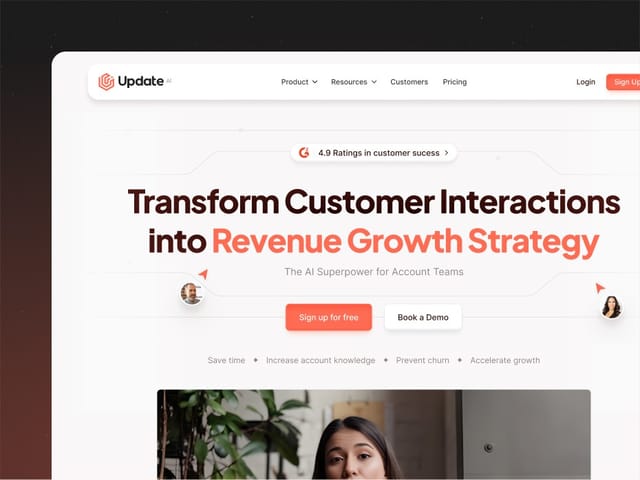
We designed and built the marketing site for Update.ai, an AI platform that turns customer conversations into recaps, stakeholder profiles, risks and follow-up actions for Customer Success teams. The work covered strategy, messaging, Figma design and the Framer build. The core decision was to show the product instead of describing it: we made custom product visuals from Update.ai's real interface and workflows, with customer data anonymized, so a busy CS leader could see what happens after a meeting without reading a paragraph about it.
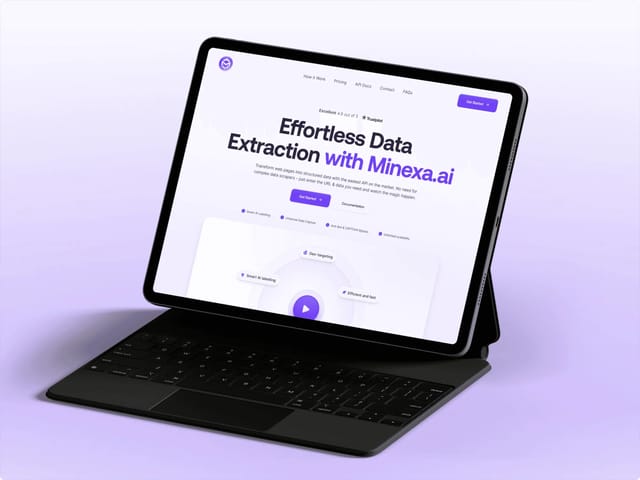
We also designed and built the site for Minexa.ai, a web-data extraction product. Its workflow has a built-in review point: Minexa detects the page structure, the user confirms what to extract, and only then does the scraper run. We structured the site around that sequence, which is the same pattern an agent site needs. Show the step where the human checks the work, and the automation that follows feels safer.
How does our process work for an agent startup?
Intro call
A free 30-minute call. We look at your product, your buyer and your current site, and tell you honestly whether a landing page, a full site or a trial week fits.
Words first
We write the positioning and page copy before any layout: the one job the agent does, the default autonomy level, the controls and the risks you answer up front.
Script the sample run
We pick one real workflow and script it step by step with your team. This becomes the hero clip, the how-it-works section and often the demo talk track.
Design
Custom design in Figma: product visuals from your real interface, the autonomy diagram, a styled action log, and a visual identity that avoids the usual AI clichés.
Build
We build in Next.js, or Framer when your team wants to edit visually, with a CMS for use cases, integrations and changelog entries.
Launch and handover
We set up analytics and demo-request tracking, check SEO and AI-crawler access, and show your team how to update the site as the agent changes.
What does an AI agent website cost?
Our website package is $8,000, fixed, for up to six pages, then $500 per extra page. That covers the copy, the custom design, the Next.js build, a CMS and animation. If you only need one conversion page for a launch or a waitlist, our landing page is $6,000. If you'd rather test how we work first, the $1,000 trial week is a real week of design and development.
- Website, up to 6 pages, copy to build
- $8,000
- Single landing page for a launch
- $6,000
- Trial week before you commit
- $1,000
For context, typical ranges we see quoted for Next.js agency builds run from about $20,000 to $120,000, and they vary a lot with scope. Timelines depend on how much of the product story already exists, so we scope them on the intro call. Our AI startup website cost guide breaks down what drives the price.
If you're building a generative AI product rather than an agent, where the output is the product, the problems are different. Our page on generative AI design covers output quality, model positioning and usage pricing. The next step either way is a free 30-minute call.