



















What makes payments startup branding different?
Payments startup branding has to make a new company feel safe to trust with money, which is a harder job than making it look modern. Your buyer is picturing failed payouts, frozen funds and support tickets nobody answers. The brand has to signal stability, precision and accountability on every surface, from the logo to the receipt email.
The trap runs both ways. Look too much like a startup, with playful illustrations and loud gradients, and finance teams wonder if you'll be around next year. Look too much like a bank, all navy and stock handshakes, and you lose the reason anyone switched. The goal is the middle: calm, exact and clearly built by people who understand money movement. Our article on fintech branding that looks established goes deeper on that balance.
Numbers are part of the brand in payments. Amounts, fees, dates and statuses appear everywhere, so we choose type with clear figures, set rules for how money is formatted, and keep success, pending and failed colors separate from brand colors.
Where should fees, disclosures and partner-bank language go?
Put disclosures where the decision happens, not only in the footer. In fintech, the trust and compliance details that matter most are regulatory status, fees and partner-bank language, and our research found that most fintech design advice stops at 'add SSL'. The real work is placing those details near the CTA, the pricing table and the signup step, and managing them so they stay accurate.
- Who holds the funds: if a partner bank or licensed provider holds funds or issues cards, say so near the product claim, in the words your partners and counsel approve.
- What it costs: fees next to the plan or the flow they apply to, with examples, not a separate legal page.
- What you are: a clear line on your regulatory status in the footer and on the about page.
- What can go wrong: payout timing, holds and reserves explained before they surprise anyone.
We build disclosures as reusable CMS blocks, so your compliance lead can update one line and have it change everywhere it appears. That's far safer than copy pasted into twenty pages. Our guide to fintech website compliance covers footer language and disclaimers in detail.
How do you design one site for merchants and developers?
Give both audiences the same core story, then split them into their own paths early. A merchant or finance lead wants pricing, payout speed, supported methods, reporting and support. A developer wants to see the API, the docs, the SDKs and a sandbox. Most payments companies sell to both, often in the same deal.
For the developer path, the research on devtool pages is useful. Evil Martians studied 100 developer tool landing pages and found common patterns: a code snippet or product UI visual in the hero, a specific CTA such as 'Start building', and docs or GitHub as the secondary action. We apply the same thinking to a payments developer section, with a short request and response example, a link to the API reference and a sandbox signup. Our article on payments websites with developer and merchant audiences shows how to split the navigation.
What pages does a payments company website need?
A payments website needs pages that answer cost, coverage, reliability and safety, plus a technical path for developers. Here's the set we plan from, before cutting it to the six pages that matter most for launch.
Page | Main reader | What it has to answer |
|---|---|---|
Home | Everyone | What you move, for whom, and why it's safer or cheaper |
Pricing and fees | Finance lead, founder | What each transaction costs, with worked examples |
Product pages | Merchant or platform | Checkout, payouts, cards, cross-border or billing, one per job |
Developers | Engineers | API overview, code sample, SDKs, sandbox, status page link |
Security and compliance | Risk and procurement | Certifications held, data handling, licensing and partners |
Coverage | Ops and expansion teams | Countries, currencies and payment methods supported |
Customer stories | Shortlisting buyers | Volume, setup and results customers let you share |
Support and status | Existing customers | How to get help, and a live status page |
Our guide to must-have pages for a fintech startup covers the order to build them in.
How should a payments company show its fees?
Show fees as plainly as you can, with an example of what a real transaction costs. Visitors in payments compare providers line by line, and a page that hides the number behind 'contact us' reads as expensive or evasive. If pricing is custom for larger merchants, show the standard rate and say who qualifies for custom pricing.
Hypothetical example: making a fee table readable
For example, suppose a cross-border payouts startup lists 'FX margin plus a fixed fee per payout'. Visitors can't tell what that means for them. The redesign keeps the same pricing but adds a small calculator: pick a currency pair and an amount, and see the fee, the rate and what the recipient gets. Below it, a one-line note explains when rates are locked.
Nothing about the price changed. The buyer can now check it against their current provider in a few seconds. This is an illustration, not a real company's pricing.
We cover more patterns in fintech pricing pages that show fees without scaring users and in fintech landing page design with fee tables and calculators.
What payments work have we done?
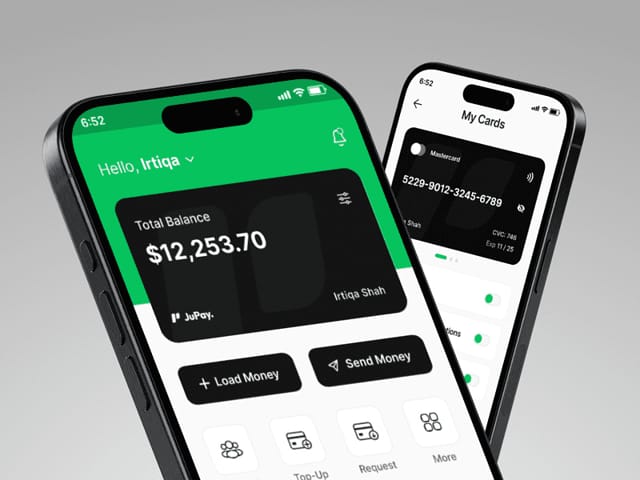
We designed JuPay, a cross-border mobile finance app that lets people send, spend and top up funds. The work ran from research to high-fidelity prototypes, covering the visual identity and the core flows: balance, card management, sending money and topping up.
The design choices were about trust as much as looks. The identity uses black, white and green, with green reserved for the actions and states that matter. The balance is the first thing users see, with a personal greeting, and the main actions, load money and send money, are always one tap away. That same thinking, clear hierarchy and money shown precisely, is what we bring to a payments brand and marketing site. For deeper product work, our guide to fintech app and dashboard design covers money-movement UI.
How does our process work for a payments startup?
Intro call
A free 30-minute call about your product, audiences, partners and current site. We'll recommend a sprint, a site or both.
Positioning and copy
We write the message for each audience and draft plain-language versions of fees and disclosures for your counsel to approve.
Brand
A brand refresh or new identity, with number formatting, status colors and type chosen for amounts and tables.
Design
Custom design in Figma for the merchant path, the developer path, pricing and the security and compliance page.
Build
A Next.js build with a CMS, including reusable disclosure blocks and a fee table your team can update safely.
Launch
Signup and demo tracking, SEO checks, a final compliance read with your team, and a handover.
What does payments branding and website design cost?
Our website package is $8,000, fixed, for up to six pages, then $500 per extra page. It includes copy, custom design, the Next.js build, a CMS and animation. If the brand needs work first, our brand and design sprint is $3,000 and covers a brand refresh or redesign plus ten website or product explorations in Figma. Typical ranges we see quoted for brand identities run from about $5,000 to $50,000, and they vary with scope.
- Website, up to 6 pages
- $8,000
- Brand and design sprint
- $3,000
- Ongoing design and development
- $6,000/mo
Timelines are scoped on the intro call, and payments projects should allow time for compliance review. Our fintech website cost guide explains what drives the price of a compliant site.
The next step is a free 30-minute call. Bring your current site, your pricing and any disclosure language your partners require.